[to update USGS list, click on Reload button]
USGS Earthquake count = -USGS max magnitude found =
[to update EMSC list, use EMSC panel & re-paste (see Help)]
EMSC Earthquake count = -EMSC duplicate (not shown) count = -
EMSC max magnitude found =
Total earthquakes showing:
Earthquakes from:
Search for older Earthquakes
In this panel you can search the USGS site for earthquakes that have happened in the past.
You will need to select the starting and ending dates that you want to gather earthquake info for. You will be
able to gather info for up to 31 days. Earthquakes with magnitudes of 2.0 and higher are allowed in the search.
End Date: Jan 29, 2013 = 2013-01-29
Min Magnitude (2.0 to 9.9): example: 6 or 6.0
Count
A remote script in this page may be vulnerable if the website USGS.gov is hacked.
About
This webpage will allow you to see earthquakes around the world in the last 24 hours (or so). The has a great site which shows earthquakes, but they seem to be lacking on showing some earthquakes in the European area. There is another site () which has earthquakes in the European-Mediterranean area. So to resolve this delima, I have built this webpage for my use. It is tested to work with FireFox browser.
Contents
Basics
When the webpage loads you will notice a map of the earth on the right. In that map you will see with a white ring. These red circles represent earthquakes shown by the USGS. Also you will notice on the left a panel with USGS earthquake data. This will periodically update (please note that updates are not automatically added to the map; you will need to use the Reload button on your browser.).
Above the USGS panel you will notice 5 radio-buttons (as shown below). These allow you to change what views in the USGS panel area. When the webpage is reloaded, the USGS panel will automatically be set to the visible panel.

- USGS -- shows you the USGS earthquake webpage. It is periodically update automatically. [Please notice that the map is not updated when the panel is updated. You will need to use the Reload button on your browser to update the USGS earthquakes on the map].
- EMSC -- since the EMSC site does not permit a webpage to automatically request info, this set of panels will allow you to manually copy/paste the EMSC info and populate them on the map. [see Adding EMSC data to Map]
- Info -- will allow you to view details on what the webpage is showing relative to the USGS & EMSC site. This panel also permits you to see the Latitude/Longitude position of where your mouse is over the map.
- Lists -- will allow you to view data about individual earthquakse which are shown in the map. It will also allow you to click on an item and highlight it on the map. Please note that you can highlight more than one item. To unhighlight an item, just click on that item again.
- Help -- this selects the help panel which you are now reading.
- Zooming -- if you hold your mouse over a location on the map and , the Google map will Zoom In/Out (respective to which direction that you roll the wheel).
- Panning -- panning is moving the image left or right or up or down. If you move your mouse over the map and use the left mouse button to drag (keep holding the left button down while moving the mouse), you will be able to pan the map as you drag the mouse.
- Earthquake Info -- if you click on one of the circles on the map, the webpage will show you a pop-up window with info on that specific earthquake. You will not be able to operate on any other webpage function until you dismiss the pop-up window by clicking the OK button.
- Restore Map original Size/Position -- if you reload the webpage, the map will be restored to it's original size and position. You will need to restore your EMSC earthquake data if you had it showing prior to refreshing the webpage. Generally the paste panel retains your pasted EMSC data, so you should only need to press the Add Points button to restore your EMSC data.
Adding EMSC data to Map
Webpages are unable to copy the contents of other sites. This is a security restriction which is enforced by browsers. The EMSC webpages fall under this restriction (different Domains). So I have provided a manual method for bringing in EMSC's data into my webpage. It will require you to copy the page contents and paste them into a temporary workarea. Then you will be able to click a button to have this webpage parse the EMSC data and show them on the Google map. The steps are shown below.
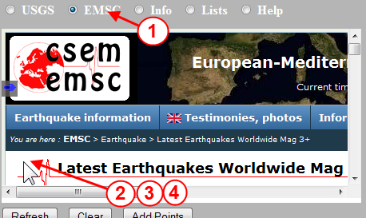
[notice the circles with steps numbers in the image above]
- Click on the EMSC radio-button to show the EMSC panels.
- Click inside the EMSC small panel (this sets the focus to the EMSC's small panel).
- Press Ctrl-A on your keyboard (this selects all text in the EMSC small panel).
- Press Ctrl-C on your keyboard (this copies the selected text into the clipboard).
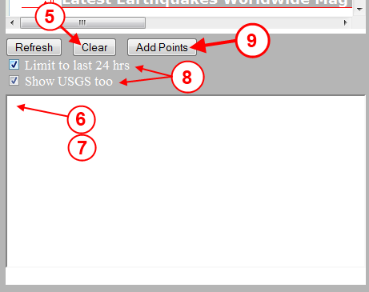
- Click on the Clear button (this will erase all text in the bottom paste panel).
- Now click in the bottom paste panel (this sets the focus to the bottom paste panel).
- Press Ctrl-V on your keyboard (this pastes your clipboard text into the bottom panel).
-
You may want to select one of these options prior to adding your data to the map:
Limit to last 24 hrs -- when checked, this will parse your EMSC earthquake info and then limit to showing just those earthquake which have happen 24 hours prior to pressing the Add Points button. When unchecked, all the earthquakes found in your pasted data will be shown on the map.
Show USGS too -- when checked will include the USGS earthquake points on the map. When unchecked, only the EMSC earthquake points are shown on the map.
[Hint: you can keep on pressing the Add Points button while changing these checkboxes and this webpage will re-parse your EMSC data each time and then plots them on the map.] - Click on the Add Points button (now the webpage will process the EMSC data you pasted and populate the Google map with new EMSC earthquakes
Info Panel